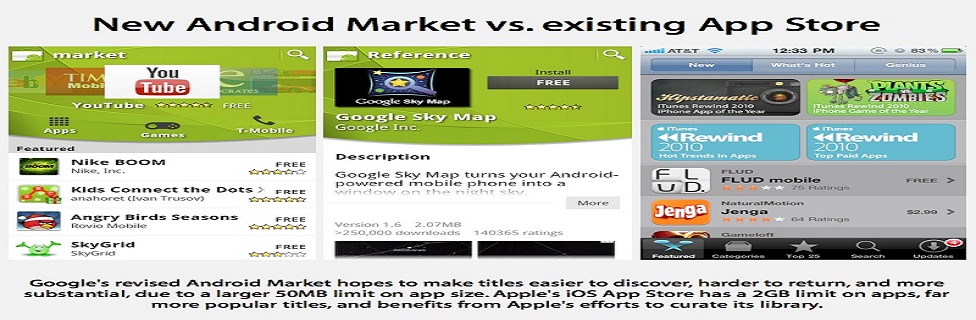
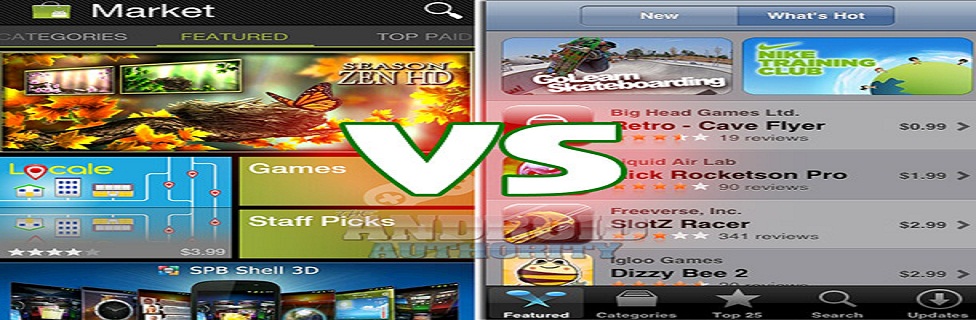
Android Markez 1

Android represent software subset for ponsel covering operating system, key application and middleware which in release by Google.

Android Markez 2

Android represent software subset for ponsel covering operating system, key application and middleware which in release by Google.

Android Markez 3

Android represent software subset for ponsel covering operating system, key application and middleware which in release by Google.

Android Markez 4

Android represent software subset for ponsel covering operating system, key application and middleware which in release by Google.

Android Markez 5

Android represent software subset for ponsel covering operating system, key application and middleware which in release by Google.


Showing posts with label Themes. Show all posts

GO Launcher EX v2.86 Apk ( Final )

0 comments


PonorogoDroid -
GO Launcher EX v2.86 Apk
Size : 4.8 MB
Requires Android: 2.0 and up
GooglePlay Link - Visit
Developer - Visit

v2.86 change log:
1. (New) New UI design for folder
2. (New) Add indicator position option
3. (New) Add app manage function in app drawer
4. (New) New GO Store 4×2 widget
5. (Improve) Highlight effect of icons and grids of home screen
6. (Improve) Add new operation tips for preview screen
7. (Fix) Home button gesture setting error


GO Launcher is the most popular home app in Android Market. It allows users to customize home screen, change themes, use smooth transition animation as well as various widgets and screen locks. It brings you a fresh and extraordinary mobile operation experience.


Features:
- Thousands of personalized themes
- Various widgets and screen locks (weather, switcher, calendar…)
- Extremely smooth transition animation
- Smooth flipping operation
- User-defined folder to easily categorize apps

Download

Apex Launcher v1.0.5 Apk

0 comments


PonorogoDroid -
Apex Launcher v1.0.5 Apk
Size : 1.7 MB
Requires Android: 4.0 and up
GooglePlay Link - Visit
Developer - Visit
v1.0.5 change log:
- Merged changes from Android 4.0.4
- Fixed force close after reboot
- Fixed transparent drawer bug

Apex Launcher helpz you create a customized homescreen experience on your ICS ( Android v4.0 and up ) devize

Features:
- Customizable homescreen grid size and up to 9 homescreenz
- Scrollable dock with up to 7 icons per page and up to 5 pages
- Infinite & elastic scrolling (homescreen, drawer and dock)
- Fancy transition effects (tablet, cube, etc.)
- Hide elements as you want (persistent search bar, status bar, or even the dock)
- Customizable icons and labels for shortcuts and folders
- Choose different folder preview styles and background
- Multiple drawer styles (transparent/opaque, horizontal/vertical, paginated/continuous)
- Drawer apps sorting (title, install date, mostly used)
- Hide apps from the drawer
- Lock your desktop to prevent accidental changes
- Enjoy homescreen gestures (pinch, swipe up/down, double tap)
- Backup/restore settings and data
- Optimized for both phonez and tabletz
- Lots of other customization options!

NOTE: Due to limitations of the Android framework, you won't be able to add widgetz from the drawer unlezz Apex Launcher iz installed az a system app (root required).


Download

GO Launcher EX v2.87 Apk

0 comments


PonorogoDroid -
GO Launcher EX v2.87 Apk
Size : 4.8 MB
Requires Android: 2.0 and up
GooglePlay Link - Visit
Developer - Visit

v2.87 change log:
1. (New) More convenient interface of adding apps(Long press home screen to enter)
2. (New) New app drawer UI design and operation
3. (Improve) App manage supports distinguish phone memory/SD card apps
4. (Improve) Initial interface and default icons on first install
5. (Improve) Enhance fluency of sliding home screen
6. (Fix) Several problems of new folder

GO Launcher is the most popular home app in Android Market. It allows users to customize home screen, change themes, use smooth transition animation as well as various widgets and screen locks. It brings you a fresh and extraordinary mobile operation experience.


Features:
- Thousands of personalized themes
- Various widgets and screen locks (weather, switcher, calendar…)
- Extremely smooth transition animation
- Smooth flipping operation
- User-defined folder to easily categorize apps

Download

Apex Launcher v1.1.0 Apk

0 comments


PonorogoDroid -
Apex Launcher v1.1.0 Apk
Size : 1.7 MB
Requires Android: 4.0 and up
GooglePlay Link - Visit
Developer - Visit
v1.1.0 change log:
- Added pinch in gesture option
- Launch shortcut option for gestures
- Added vertical dock margin option
- Added Root Helper (see tips)
- Wallpaper mode option (see tips)
- Improved performance and reduced redraws
- Improved gestures
- Fixed a landscape dock bug
- Fixed a bug with vertical drawer
- Various optimizations and bug fixes
- Updated translations

Apex Launcher helpz you create a customized homescreen experience on your ICS ( Android v4.0 and up ) devize

Features:
- Customizable homescreen grid size and up to 9 homescreenz
- Scrollable dock with up to 7 icons per page and up to 5 pages
- Infinite & elastic scrolling (homescreen, drawer and dock)
- Fancy transition effects (tablet, cube, etc.)
- Hide elements as you want (persistent search bar, status bar, or even the dock)
- Customizable icons and labels for shortcuts and folders
- Choose different folder preview styles and background
- Multiple drawer styles (transparent/opaque, horizontal/vertical, paginated/continuous)
- Drawer apps sorting (title, install date, mostly used)
- Hide apps from the drawer
- Lock your desktop to prevent accidental changes
- Enjoy homescreen gestures (pinch, swipe up/down, double tap)
- Backup/restore settings and data
- Optimized for both phonez and tabletz
- Lots of other customization options!

NOTE: Due to limitations of the Android framework, you won't be able to add widgetz from the drawer unlezz Apex Launcher iz installed az a system app (root required).


Download

Nova Launcher Prime v1.1.3 Apk

0 comments


PonorogoDroid -
Nova Launcher Prime v1.1.3
Size : 1.6 MB
Requires Android: 4.0 and up
Play Store Link - Visit
Developer - Visit


v1.1.3 change log:
- Not available

Highly customizable, performance driven, home screen replacement for Android 4.0+

Prime Features:
Drawer Groups:
Folders in App Drawer
Unlimited custom tabs
Organize apps into tabs and folders in the app drawer

Gestures
Quickly start Nova Actions or Apps from gestures on the desktop, such as pinching, swiping or two-finger swiping.

Hide Apps
Keep a clutter free drawer by hidding never used apps.

Dock Swipes
Get more use out of your dock apps by setting swipe-actions

Unread Counts
Never miss an email. Unread count badges for SMS, Missed calls and Gmail. Counts show in the dock, desktop, drawer and folders.

More Scroll Effects
(If Prime is not activating please try Nova Settings > Restart Nova Launcher or emailing me with your google order number and I can send you a code)


Download

WidgetLocker Lockscreen v2.2.6 Apk

0 comments


PonorogoDroid -
WidgetLocker Lockscreen v2.2.6
Size : 3.2 MB
Requires Android: 2.1 and up
Play Store Link - Visit
Developer - Visit

v2.2.6 change log:
- Fixes an FC in 2.2.5

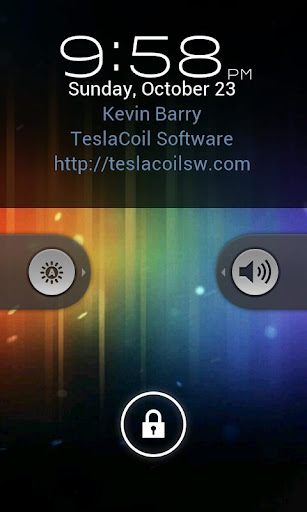
WidgetLocker is a lock screen replacement that puts you in control of the look, feel and layout of your lock screen.

Features:
Drag and Drop placement of Sliders, Android Widgets and App Shortcuts
- Sliders look selectable from built-in styles (Ice Cream SandwichGingerbread, Sense and Sense 3, Motorola, iPhone, and Rotary) or from user-themes.
- Slider Actions can be customized, for example Slide-to-launch-Camera or Slide-to-call-your-Girlfriend.
- Resizable widgets and custom grid size
- Notification badges on apps/sliders via TeslaUnread
- Customize which widgets/buttons are allowed or blocked at the lock screen


Download | Download | Download

TSF Shell v1.42 Apk

0 comments


PonorogoDroid -
TSF Shell v1.42 Apk
Size : 3.7 MB
Requires Android: 2.1 and up
GooglePlay Link - Visit
Developer - Visit


v1.42 change log:
- A new sliding mode for extended screen switches.
- Lasso activating mode is changed to tap on the edit button on the upper right of the screen.
- A new 360° screen selecting mode.
- Uninstallation function to apps.
- Support to Android native shortcut ( bookmarks and all kinds of apps).
- Fix Crashing issues.
- Fix Widget disappearing issue after TSF Shell restarted.
- Fix Display issue for HD wallpaper.

TSF Shell 3D is an interface with brand new operating system Enable you to freely personalize various widgets to a full range. Let’s say goodbye to the traditional operation system.

Features:
- Enable you to do multipul-operation, including auto-arragement, multipul-choices, add-to-folder, multipul-deleting, to the items by only one move of the finger. You can also check your folders in various ways.

- TSF SHELL 3D has one app page and 4 personalized pages for our users. You can switch between pages by one click at the switch button in the lower left corner.

- You can freely create one or more quicklinks for apps and drag them to any page. You can also distribute all the app icon (or even change their angles) freely in the personalized page.

- The side column provides the most TSF Shell 3D charateristic widgets, including folders, contacts, music player, weather and so on.

- The side column can be personalized as well, including changing the order and position of different catagories. You can create quicklinks of your most frequently used apps and contact in the quick launch in the side column.

- TSF Shell 3D has a most powerful theme function. Apart from the difference in style, some themes even allow change in the transition animation.


Download Or Download Or Download

MoreQuicklyPanel v1.5.0.0 Apk

0 comments


PonorogoDroid -
MoreQuicklyPanel v1.5.0.0 Apk
Size : 1.0 MB
Requires Android: 3.0 and up
Play Store Link - Visit
Developer - Visit

v1.5.0.0 change log:
Improved:
- Added the 'Mobile data' toggle. Equivalent to Settings > Data usage > Mobile data.
- Added the option "Give the top to ...". To avoid the battle with MoreQuicklyDock for the top position.
- Added [About] screen.
- Changed the position and the text of the button [Show/Update] and [Close/Exit]. In accordance with ICS Design.
Fixed:
- Added the ability to disable Wifi before enabling Wifi hotspot.
- Changed the update method to avoid hopping at the notification panel.

MoreQuicklyPanel is the customizable toggle widget stays at a notification panel. Only for Android 4.0 Ice Cream Sandwich and Android 3.x Honeycomb.

Features:
- 14 function buttons
-- Airplane mode: Display airplane mode status and toggle it.
-- Silent mode: Display silent mode status and toggle it. Normal -> Vibrate -> Silent and Normal again.
-- Wi-Fi: Display Wi-Fi status and toggle it.
-- Bluetooth: Display bluetooth status and toggle it.
-- GPS: Display GPS status and open GPS settings.(Apps cannot change GPS status by the system security.)
-- Auto-rotate screen: Display automatic screen rotation status and toggle it.
-- Accounts & sync (Auto-sync): Display accounts & sync (auto-sync) status and toggle it.
-- Brightness: Display brightness status and toggle it. Auto -> Dim -> Normal -> Max and Auto again.
-- Mobile network settings: Open 'Mobile network settings' screen. You can toggle 2G/3G/4G and 'Mobile data (Data enabled)' from there.
-- WiFi hotspot (Beta) (Update!): Display portable WiFi hotspot status and toggle it. This function is released for test purpose. Please try carefully and report the result.
-- Mobile data (New!): On / Off mobile data = data access over Mobile network. Equivalent to [Settings] > [Data usage] > [Mobile data] and [Settings] > [More...] > [Mobile networks] > [Data enabled] .
-- Battery: Display battery meter and open battery status screen.
-- MoreQuicklyPanel settings: Open MoreQuicklyPanel settings.
-- Close notification panel: Close a notification panel.


Download

Weather+ HD v1.2.1 Apk

0 comments


PonorogoDroid -
Weather+ v1.2.1 Apk
Size : 41 MB
Requires Android: 2.2 and up
Play Store Link - Visit
Developer - Visit

v1.2.1 change log:
- We have solved some issues in this update. Thank you for your feedback!
- Editing a location in the widget configuration now works.
- Widgets now take GMT Offset into account when set
- Widgets from removed locations now show as "Location not available"
- Solved a crash concerning:
- loading incomplete weather data.
- removing and adding locations in the widget configuration
- adding locations in the widget configuration not reflecting in the application

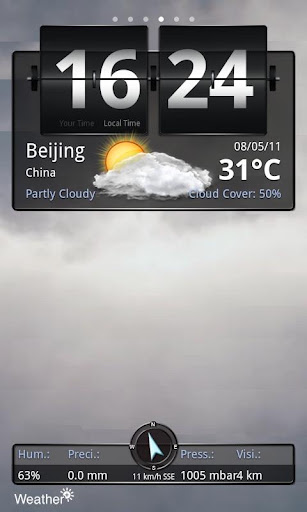
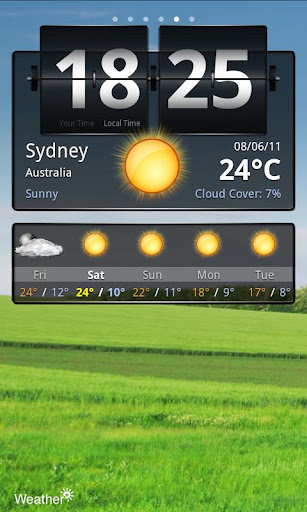
Weather+ gives you current worldwide weather conditions and a 5-day forecast.

Features:
☀ Weather and time details for an unlimited number of cities.
☀ Full screen video loops of the weather in the selected location.
☀ Fully functional on all Android devices and resolutions!
☀ Standard weather info like condition description and temperature.
☀ Wind direction and speed details.
☀ Humidity, precipiation, pressure and visibility details.
☀ 3-hourly weather forecast for a total of 5 days.
☀ Swipe the screen from left to right to switch between selected locations.
☀ Flip clock with World Clock time of your current location and of the selectedlocation.
☀ Switch between Fahrenheit/Miles and Celsius/Kilometers


Download | Download

iLauncher apk v2.1.5.1

0 comments


iLauncher3 iLauncher apk v2.1.5.1 (2.1.5.1) DownloadiLauncher apk3 iLauncher apk v2.1.5.1 (2.1.5.1) DownloadiLauncher android1 iLauncher apk v2.1.5.1 (2.1.5.1) Download
iLauncher v2.1.5.1
Requirements: Android OS 2.1 and up
iLauncher apk is an iPhone style house screen.
iLauncher 2.1.5.1 apk ATTRIBUTES
- Easy scrolling
- Symbols have actually rounded edges and gloss results.
- Long contact icons to shift them around and also place them as you prefer.
- Dock-bar
- Simply uninstall apps from your house display.
- Press the back button to egress edit mode.
- Can alter each application’s name as well as symbol
- Limelight search
- Directory
- Shortcuts
iLauncher 2.1.5.1 Updates:
v2.1.5.1
- Bug patch


Puddle THD apk v1.02

0 comments


Puddle THD Puddle THD apk v1.02 (1.02) DownloadPuddle THD apk Puddle THD apk v1.02 (1.02) DownloadPuddle THD android Puddle THD apk v1.02 (1.02) Download
Puddle THD v1.02
Requirements: Android OS 3.1 and up
Only for NVIDIA Tegra 3 Powered Devices.
Victor at the Independent Games Festivity 2010, Puddle THD apk is presently offered specifically on
devices making use of Tegra 3 technology. Puddle THD apk harnesses the power of the NVIDIA Tegra
3 powered equipments to produce an unmatched practical physics-based gaming experience!

Dive into Puddle THD apk, a game unlike other where you need to lead a puddle of fluid by tipping the
atmosphere to the left or right!
Puddle THD 1.02 apk Features:
Play very carefully taking friction, gravity and also climate in to bank account, and also by using the different
realties of each sort of fluid (water, oil, nitroglycerin, molten lava …) in a selection of initial atmospheres.
Cut back as much fluid as possible when going across an assortment of challenges such as burning passageways, carnivorous plants and electric currents!
Puddle THD android Features:
- Optimized for Tegra 3 powered gadgets presenting console-quality HD graphics, highest quality shaders, incredible fluid simulation!
- 40 + degrees
- Assistance for Bluetooth or USB game controllers. (USB gamepads just helped on Android 3.1 or higher)
- Contrast your skills with those of your good friends and the throughout the world OpenFeint neighborhood,
Puddle THD android
- Exceptional degrees will definitely be obtainable every week for download … for free!
Puddle THD 1.02 Updates:
- Currently obtainable for Toshiba Excite 7.7 (AT270)
- Online game is right now paused when the device resumes from sleep method to the lock screen
- Food selection bar extracted