Android Markez 1

Android represent software subset for ponsel covering operating system, key application and middleware which in release by Google.

Android Markez 2

Android represent software subset for ponsel covering operating system, key application and middleware which in release by Google.

Android Markez 3

Android represent software subset for ponsel covering operating system, key application and middleware which in release by Google.

Android Markez 4

Android represent software subset for ponsel covering operating system, key application and middleware which in release by Google.

Android Markez 5

Android represent software subset for ponsel covering operating system, key application and middleware which in release by Google.


Kaspersky Mobile Security v9.10.112

1 comments

PonorogoDroid - 

Nama antivirus: Kaspersky Mobile Security v9.10.112

Kapasitas file: 5.1MB

Kompatibel: OS Android

"KASPERSKY MOBILE SECURITY IS ONE OF THE BEST MALWARE PROTECTION SOLUTIONS" - AV-TEST.ORG*
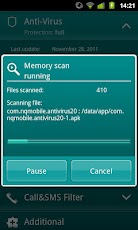
Protect your smartphone like the mini-PC that it is. Kaspersky Mobile Security delivers real-time protection from viruses, spam, malicious programs, and unwanted calls and SMS texts, plus an instant, cloud-based scanning of downloaded apps. Our unique privacy mode allows you to control access to your contacts and communications. And, advanced anti-theft protection remotely disables, cleans, and finds your missing phone via Google Maps – even if your SIM card has been replaced.
ANTI-THEFT PROTECTION: Block, clean or find your missing phone even if your SIM card has been replaced
ANTI-VIRUS PROTECTION:
• The latest technologies prevent viruses and spam from infecting your phone while you’re surfing the Internet
• Automatic, cloud-based scanning of downloaded apps
• On-demand and scheduled scans allow you to set up antivirus scanning when it’s most convenient for you
CALL & SMS FILTER: Blocks unwanted calls and SMS texts
PRIVACY PROTECTION:
• Control what others can see and access when they pick up your phone
• Keep designated incoming calls and SMS texts completely hidden until you’re ready to view them
• Activate “Private” mode manually, automatically, or remotely
SUPPORTED LANGUAGES
Danish, Dutch, English, Finnish, French, German, Italian, Korean, Norwegian, Polish, Portuguese (Brazil), Russian, Spanish, Swedish
SYSTEM RQUIREMENTS
Android 1.6 – 2.3
*www.av-test.org/fileadmin/pdf/avtest_2012-02_android_anti-malware_report_english.pdf


Voice Control v2.1.1 Apk

0 comments


PonorogoDroid -
Voice Control v2.1.1 Apk
Size : 670 KB
Requires Android: 2.2 and up
Play Store Link - Visit
Developer - Visit

v2.1.1 change log:
- Fixed bluetooth incompatibility with some devices.
- Fixed crashes on options opening on devices without bluetooth.
- Tried to apply a fix for rare crashes on options reopening and rotation on some devices.
- Removed the confirmation request when the command is recognized with an accuracy of 100% and the results isn't the first one returned by the Voice Recognition engine.
- Little improvements on date handling and parsing
- Added number announce for incoming calls from callers not in the contact list.

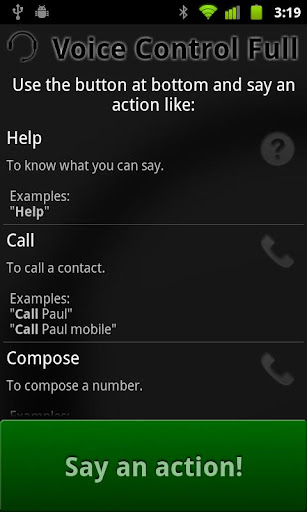
Control your phone while you are driving your bike or your car without the need to check and use the screen! Start callz to contactz and numberz, send messagez, play muzic, handle lost callz, unread messagez and more only with your voice.

You can start Voice Control with a long press on search button (for equipped phones), with the green button on application main screen, or with the button for voice calls of the Hands-Free Android compatible bluetooth device.

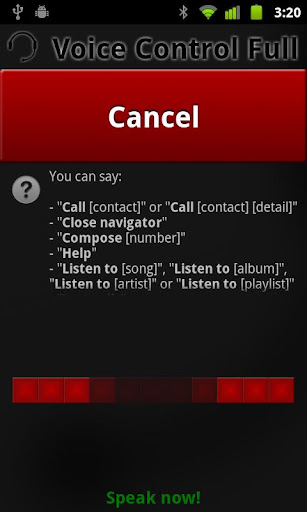
The available voice actions and commands are:
- Call a contact
- Compose a number
- Send a message to a contact
- Listen to a song, a playlist, an album or all songs from an artist (supports local phone media, and listen to a playlist, an album and to all songs from an artist works and has been tested only with Google Music Player, PowerAMP, Music PlayerPro and Winamp)
- Manage lost calls
- Manage unread messages
- Start the navigation to a destination (actually works only with Google Navigator)
- Stop the navigator (may not works with all Phones and version of Google Navigator)
- Start an application
- Add an event to calendar (only for Italian, English, French, German and Spanish, working in progress for Russian)
- Add an alarm to the phone (only for Italian, English, French, German and Spanish, working in progress for Russian)
- Help action do ask what can be said
- Action to know current date and time


Download | Download | Download

Panduan Pemrograman Android

1 comments


PonorogoDroid - Android adalah platform mobile yang sedang berkembang pesat, tidak heran minat belajar pemrograman android terus meningkat terutama di kalangan mahasiswa IT. Berikut ini saya berikan panduan pemrograman android secara gratis yang terdiri dari 6 Bab. Pendekatan panduan bersifat praktis, jadi di buku ini tidak akan dijelaskan konsep,sejarah dan sejenisnya. Artinya Bagi anda yang ingin belajar pemrograman android, buku ini sangat tepat untuk memulai belajar. Bab dalam buku ini adalah sbb:
  •  Konverter
  • Image viewer
  • Music Player
  • Web browser
  • Map vewer
  • Contact
Lisensi dokumen ini adalah Creative Common  CC-BY-ND-NC yang artinya anda boleh menyebarkan, mengkopi, mencetak dan  mamakai panduan ini namun dengan syarat syarat sbb:
  1. Tidak boleh mengakui kalau itu adalah karya anda, Nama penulis harus selalu di sertakan
  2. Anda tidak boleh meremix atau mencampur dokumen ini dengan dokumen lain. Cetak dan kopi apa adanya
  3. Anda tidak boleh mengkomersialkan panduan ini dalam bentuk apapun.

Source code bisa di download di sini

Camera WiFi LiveStream v1.9.3 Apk

1 comments


PonorogoDroid -
Camera WiFi LiveStream v1.9.3
Size : 2.1 MB
Requires Android: 1.6 and up
Play Store Link - Visit
Developer - Visit

v1.9.3 change log:
- Remove "Read phone state" permission - no longer needed for DRM or GetJar SDK
- Update GetJar Rewards implementation and SDK

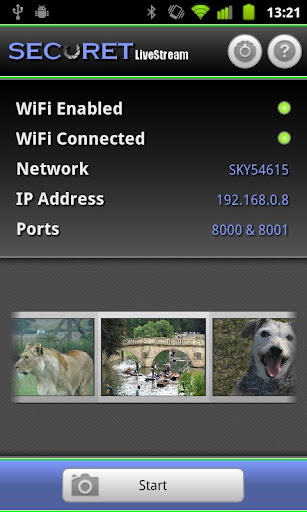
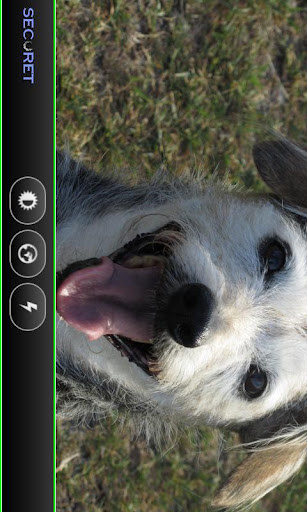
Stream video and audio from your Android device’s camera directly across your Wi-Fi network in real-time, to be viewed and remotely controlled in a web browseror on another Android device. Can be used to spy on people, a serious surveillancedevice or just for fun!

FEATURES
1. Stream real-time live video and audio from your Android device camera to aweb browser;
2. Can also stream directly to another Android device (in conjunction with SECuRET SpyCam);
3. Very simple to use for everybody - no configuration needed and nointermediate/external servers involved;
4. Remotely control the camera! Take full resolution pictures and hi-def videos using the web browser (requires Android 2.2 or above);
5. Choose between the front and back camera (requires Android 2.3 or above and a front camera);
6. Disguise mode and touch screen locking so your device can't be detected;
7. Requires Java installed on the web browser computer;
8. Advanced settings to tweak performance;
9. Choice of streaming resolutions;
10. Only uses a WiFi network – does NOT support 3G;


Download

Stardom The a-list v1.2.1 Apk

0 comments


PonorogoDroid -
STARDOM: THE A-LIST v1.2.1
Size : 23 MB
Requires Android: 2.1 and up
Play Store Link - Visit
Developer - Visit

v1.2.1 change log:
- Make your mark in NYC! Go to the airport if level 14+!
- Earn stars after inviting your friends into your very own ENTOURAGE.
- Date famous or rich celebs to get more fans or cash!
- NEW DATING LEVELS from “casual” to “engaged”!
- Tons of new NYC-style CLOTHING and accessories for both guys and girls!
- Tons MORE FANS available, & no more losing fans automatically every day!
- INVITE FRIENDS from Facebook & get free stars!
- Levels 25 & 26 added.
- Facebook login issue fixed.

Can you reach the A-List? Schmooze, flirt, lie, fight – and maybe even work – your way to STARDOM!
From getting off the bus as a nobody to accepting an award as an international superstar, get rich and famous by starring in movies and TV shows and winning over fans.

- Customize your star look with the latest styles and hottest accessories!
- Hollywood in your hands – complete with exclusive clubs, upscale restaurants, movie studios and more
- Work on-set to earn a 5-star performance, rave reviews, and more fans
- Date and dump celebrities, party at the best venues, and live it up in a luxury home with your exotic pets
- Invite friends to exclusive parties, have them co-star in your projects, or check the Top 100 to see who’s more famous


Download | Download | Download

BatteryXL Pro v2.0.1 Apk

0 comments


PonorogoDroid -
BatteryXL Pro v2.0.1 Apk
Size : 1.9 MB
Requires Android: 2.1 and up
Play Store Link - Visit
Developer - Visit

v2.0.1 change log:
- Important: If upgrading from a version below 2.0.0 you MUST firstUNINSTALL BXL before installing v2.0.0 or above.
- Added: Battery Capacity and Temperature Display are now editable
- Added: SmartSync schedule can now be configured to simultaneously enable WiFi or Data

BatteryXL is the top choice among Android battery and efficiency applications. It offers intuitive, cutting-edge design teamed with powerful yet simple functionality.

Advantages:
- Customizable savings modes
- Mode automation based on battery level, charge state, and time of day
- Designed according to Android 4.0 ICS specifications (also works with anyAndroid version 2.2 and above)
- Strongest, most advanced savings functionality among mode-based battery savers.
- Powerful, fully customizable widget with many toggle options

Read Features list from here

Download

Cara Root HP Android

1 comments


PonorogoDroid - Apa sih root itu ? yang sudah terbiasa dengan system operasi berbasis linux tentu sudah familier dengan istilah root, root atau kadang di sebut superuser bisa di katakan account yang mempunyai kekuasaan penuh pada system operasi berbasis linux, artinya root mempunyai hak akses penuh untuk merubah, menambah, menghapus bahkan merusak system.
Sedangkan Nge-root sendiri artinya adalah usaha untuk merubah user biasa agar bisa menjadi superuser atau root.

Disini saya akan berbagi cara nge-root android phone, kali ini saya akan mencoba nge-root samsung android mini yang saya punya.
Yang perlu di persiapkan adalah:

  • Komputer tentunya ,  tidak mungkinkan mau pakek kalkulator hehe,  kebetulan os yang saya pergunakan menggunakan windows xp
  • Jika anda menggunakan windows xp pastikan windows anda sudah terinstall Microsoft .NET Framework 2.0+ , microsoft .NET framework 4.0 disertakan di cd kies atau anda bisa donwload disini , jika anda menggunakan windows vista atau windows 7 anda tidak perlu lagi install, sudah tersedia native.
  • Kabel data/mikro usb , kalau dalam paket pembelian samsung galaxy mini tidak di sertakan, anda bisa menggunakan mikro usb punya nokia, atau handphone lainnya yang penting mikro usb lah.
  • Install software kies nya terlebih dahulu, software ini ada di sertakan dalam paket pembelian samsung android.
  • Pastikan batrei terisi penuh.
  • Pastikan sd card anda dalam kondisi unmount.
  • Donwload software bantu untuk nge-root, kita akan menggunakan software bantu SuperOneClick bisa anda download DISINI

Kalau persiapan di atas sudah di lakukan kita lanjut langkah-langkahnya.

  • Setting android ke adb mode masuk ke setting > Applications > Development > Centang USB debugging.


  • Colokkan HP android anda ke komputer menggunakan kabel data.
  • Buka aplikasi SuperOneClick dengan mengklik 2X pada file SuperOneClick.exe


  • Pilih versi android pada setting metode Exploit nya.


  • Klik tombol root, kemudian tunggu prosesnya sampai selesai.
  • Restart HP anda.
  • Untuk mengecek berhasil tidaknya proses rooting bisa dengan cara melihat apakah aplikasi superuser sudah terinstall di HP anda atau dengan cara menjalankan aplikasi yang memerlukan akses root seperti titanium backup (bisa download di market).
  • Selesai.

Oke droids sekarang anda sudah bisa melepas kabel mikro usb, lihat di android anda kalau sudah ada aplikasi bernama superuser dengan gambar tengkorak berarti anda sudah berhasil nge-root android anda, jika tidak muncul coba restart handphone anda.
Cara ini tidak hanya untuk handphone android samsung galaxy mini, tapi juga bisa di gunakan untuk merk yang lain. untuk lebih jelasnya android apa saja yang bisa di root dengan cara ini anda bisa langsung menuju kesini
Kalau masih kurang paham juga bisa di simak video di bawah ini.

FAQ :
Q: Apakah semua android phone perlu di root?
A: Tidak, tergantung kebutuhan saja, yang belum mengerti betul tentang android tidak di sarankan.
Q: Apa manfaat kalau android kita di root ?
A: Agar kita bisa bebas memodifikasi sistem nya, contoh
Hapus-hapus aplikasi bawaan dari hape untuk menghemat memori internal.
Memindahkan aplikasi yang hanya bisa disimpan di internal memory ke SD card, sehingga internal memory bisa lebih longgar.
Kita bisa install aplikasi yang membutuhkan akses root.
Q: Apakah rooting dapat menghilangkan garansi ?
A: YA
Q: Apa bisa dikembalikan ke unroot lagi?
A: Bisa
Q: Apa resikonya.
A: Dari berbagai sumber ada yang bilang kalau nge-root android bisa menghilangkan garansi, ada juga sih yang bilang tidak ada pengaruh, kalau saja bisa menghilangkan garansi tinggal di unroot lagi kan.

Catatan: Saya tidak bertanggung jawab jika android anda rusak, gagal rooting, garansi hilang, mati total, karena mengikuti cara ini resiko anda tanggung sendiri.

Apa sih Root itu???

0 comments


PonorogoDroid - Apa sih Root itu?

Root artinya kita memiliki hak superuser/administrator kalau di windows, dgn ini kita bisa menginstall aplikasi2 yang memerlukan akses root. Melakukan Root berarti akan menghanguskan garansi (jika ketahuan Vendor masing – masing ponsel) tapi biasanya setiap aplikasi untuk Rooting juga menyediakan UnRoot dan caranya pun cukup mudah hanya 1x klik saja.
untuk melakukan root diperlukan sbuah software yang namanya Universal Androot. sangat gampang gunakannya. tinggal klik trus tunggu deh prosesnya.
langsung aja.
  • Pertama install dulu Universal Androot. terlihat seperti gambar dibawah ini. 

root

  • Keduanya adalah menunggu. kadang menunggu hal yang membosankan tapi kali ini nunggu yang asik. hehe..., tunggu hingga proses instalasi selesai. terlihat seperti gambar dibawah ini.

root2

  • Ketiga.ini dia proses yang paling asik dan menegangkan. tinggal klik root kaya gambar dibawah.

root3

  • Keempat. nah….lagi – lagi kita menunggu dan menunggu. g bosan apa yang nunggu tu? hehe..kali ini kita nunggu proses root. 

root4

  • Kelima. tara,,,,, root udah selesai.

root3

kalo mau bukti root udah berhasil apa tidak tinggal buka menu trus ada icon yang namanya superuser permissions kaya gambar dibawah.

root5

kalo mau unroot caranya sama kok.